Ticket Settings
The ticket settings can be found on the settings screen. This section starts with sensible default settings, but you will probably want to change it at some point. Ticket settings control the format of the ticket numbers, the statuses available on the ticket screen, and allows you to add custom fields to the ticket screen.
Ticket number format
There are two fields at the top of the Ticket Settings section: “Job number to start incrementing at” and “Job number format”. These allow you to change the way you generate ticket numbers. You can change these if you want custom ticket numbers. For the format, write how you would like the ticket numbers to look, but replace numbers that you want to increment with “*” characters.
E.g. Setting the format to “AB-*****” would produce tickets numbered “AB-00001”, “AB-00002” … etc
Set ticket statuses to suit your business
Below ticket number settings are status settings. These affect what statues are available to select on the ticket screen. Statuses are used to sort your tickets into buckets on the your dashboard, and easily find tickets in the ticket list.
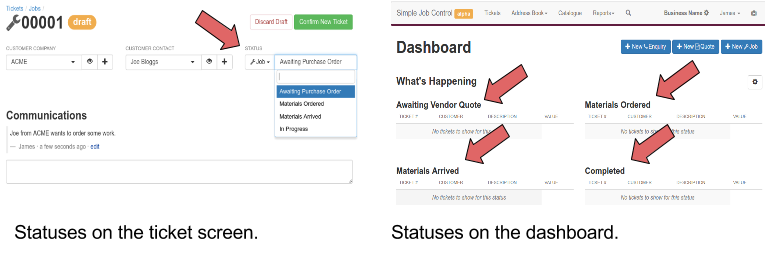
The main places that statuses will be displayed.
Statuses are divided up into three sections - Enquiry, Quote and Job. Tickets can be an
enquiry, a quote, or a job stage. You can set different statuses for each stage.
You can remove statuses by clicking the “-“ button next to them, or change them by editing the text.
You can also add new statuses by clicking the “+” button.
Extra fields
You can add custom text fields to the ticket screen to keep track of business information that is not covered by the existing screen.
Custom extra fields on the job screen
Be sure to click save when you have finished editing the statuses.