Ticket
If you can read and understand this one document then you have understood 80% of Simple Job Control. Everything else in the system is just a way to add or remove information from a ticket - or report on that information. With that said, let’s get started.
A Ticket is the fundamental unit in Simple Job Control. A ticket represents some work that is
done for a client, from start to finish. A ticket has 4 stages in its lifecycle: enquiry,
quote, and job and completed.
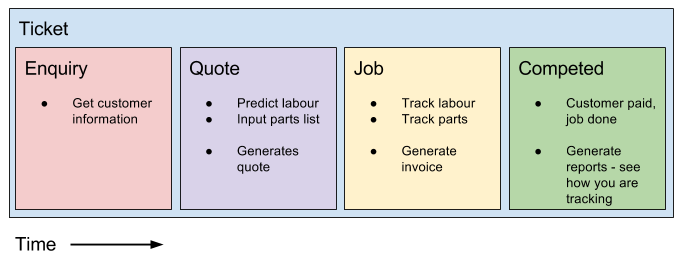
A ticket can also be open or closed, which tells the system whether you are done with it or
not. Closed tickets are hidden by default in your ticket list - but they can be unhidden or reopened
at any time.
Enquiry
An enquiry is the stage in a tickets lifecycle when a customer has shown interest, but there is uncertainly about whether you will proceed with the job.
An enquiry lets you gather the customers contact information, and record your communications with them.
Quote
A `quote` and a `quote hardcopy` are different things in simple job control. A `quote` is a stage in the lifecycle of a ticket. A `quote hardcopy` is something that you give to the customer to tell them how much a certain job will cost.
A quote represents work that you are hoping to win. Once a ticket is a quote you can add more information to it such as:
- Description
- Notes
- Estimated delivery time
- Discount
- Any number of custom fields…
You can also add materials, estimated Labour, and any actual labour that you may have undertaken in the quoting process.
The system can use this information to automatically generate quote hardcopies that you can send to your customers.
Job
A job represents work in progress. Similar to a quote you can track materials and labour - but a job also lets you generate invoices and jobcards.
Completed
A completed ticket represents a the successful completion of this unit of work. Generally you would advance a ticket to completed once you have received payment.
Once a ticket is advanced to completed it is automatically closed.
A good rule of thumb is to only mark tickets as completed when you have received payment for them as this allows the system to know what tickets have been paid for.